If you enjoy customizing your desktop, a good live wallpaper can instantly change the way your PC looks. The Sparkle Wave animated live wallpaper is a simple but stylish option that adds a smooth glowing wave effect to your desktop background. It creates a clean and modern look without making your screen feel crowded. When combined with tools like Rainmeter widgets and Nexus Dock, the setup becomes even more attractive and functional.
What is Sparkle Wave Live Wallpaper?
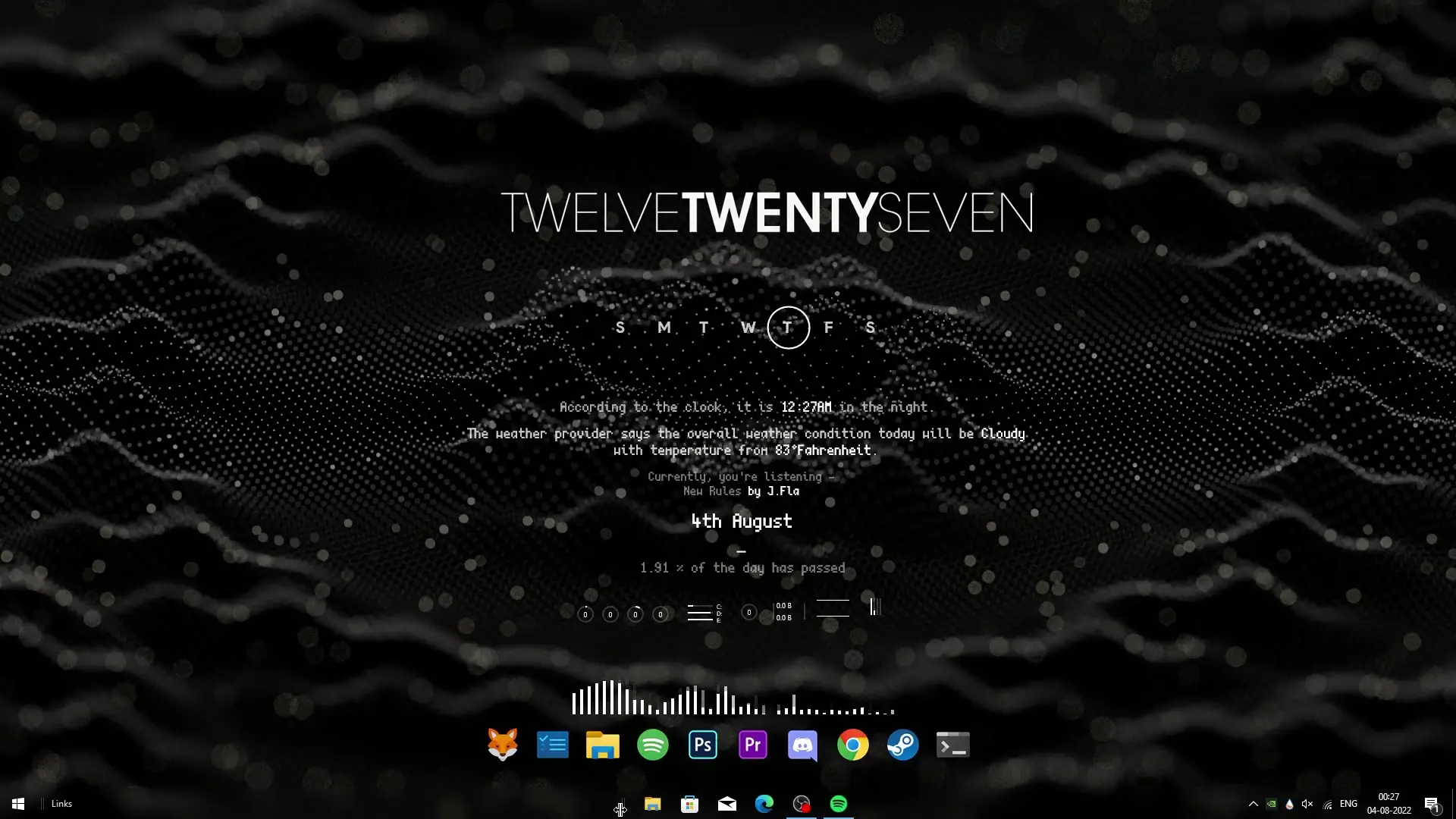
Sparkle Wave is a minimal animated wallpaper designed for Windows desktops. Instead of using static images, this wallpaper shows a gentle wave pattern with sparkling light effects that move smoothly across the screen. The animation is subtle, which means it looks lively without being distracting.
Because the animation is lightweight, it usually runs smoothly on most computers. Even mid-range systems can handle it without noticeable performance issues. This makes it a good choice for users who want an animated desktop but still want their PC to stay responsive.
Another benefit is its clean design. The wallpaper uses simple shapes and glowing highlights, so icons and widgets remain clearly visible on top of it.
Making the Desktop Look Better with Rainmeter
While the wallpaper itself already looks good, the real magic happens when you add Rainmeter widgets to the desktop. Rainmeter is a popular customization tool that lets you place useful widgets directly on your screen.
With Rainmeter, you can add:
- Clock widgets
- System monitoring panels (CPU, RAM, network usage)
- Weather widgets
- Music players
- Minimal system dashboards
These widgets sit on top of the Sparkle Wave wallpaper and create a stylish desktop layout. The glowing animation in the background pairs well with modern widget skins, giving the whole setup a futuristic appearance.
Another advantage is that Rainmeter skins are highly customizable. You can move them anywhere on the screen, change their size, and adjust their transparency to match the wallpaper theme.
Adding Nexus Dock for a Mac-Style Dock
To complete the desktop setup shown in the tutorial, Nexus Dock is used. Nexus Dock is a desktop dock that works similarly to the dock found in macOS.
Instead of placing all your application shortcuts on the desktop or taskbar, Nexus Dock allows you to keep them in a stylish dock that sits at the bottom or side of the screen.
Features of Nexus Dock include:
- Smooth icon animations
- Custom icon packs
- Easy drag-and-drop shortcuts
- Dock transparency effects
- Quick access to frequently used apps
When combined with the Sparkle Wave wallpaper, the dock creates a very polished desktop environment. Matching icon packs can make the theme look even more consistent.
Why This Desktop Setup Looks So Good
The reason this setup works well is because each element complements the others.
The Sparkle Wave wallpaper provides motion and visual style.
Rainmeter widgets add useful information and customization.
Nexus Dock organizes applications in a clean and modern way.
Together, they create a desktop that looks organized, stylish, and functional. It feels more personal than the default Windows layout and makes using your PC a bit more enjoyable.
✅ DOWNLOAD ✅
Performance and System Impact
Many people worry that animated wallpapers will slow down their computer. In most cases, this setup runs smoothly because the animation is lightweight and the widgets are optimized.
If you have a very old PC, you can always reduce the number of widgets or simplify the layout. On most modern systems, however, the difference in performance is barely noticeable.
Final Thoughts
The Sparkle Wave animated live wallpaper is a simple way to give your desktop a modern and dynamic look. When paired with Rainmeter widgets and Nexus Dock, it transforms a basic Windows desktop into a visually appealing workspace.
If you enjoy customizing your PC and experimenting with different themes, this setup is worth trying. It is easy to install, looks impressive, and can make your everyday desktop experience feel fresh and unique.