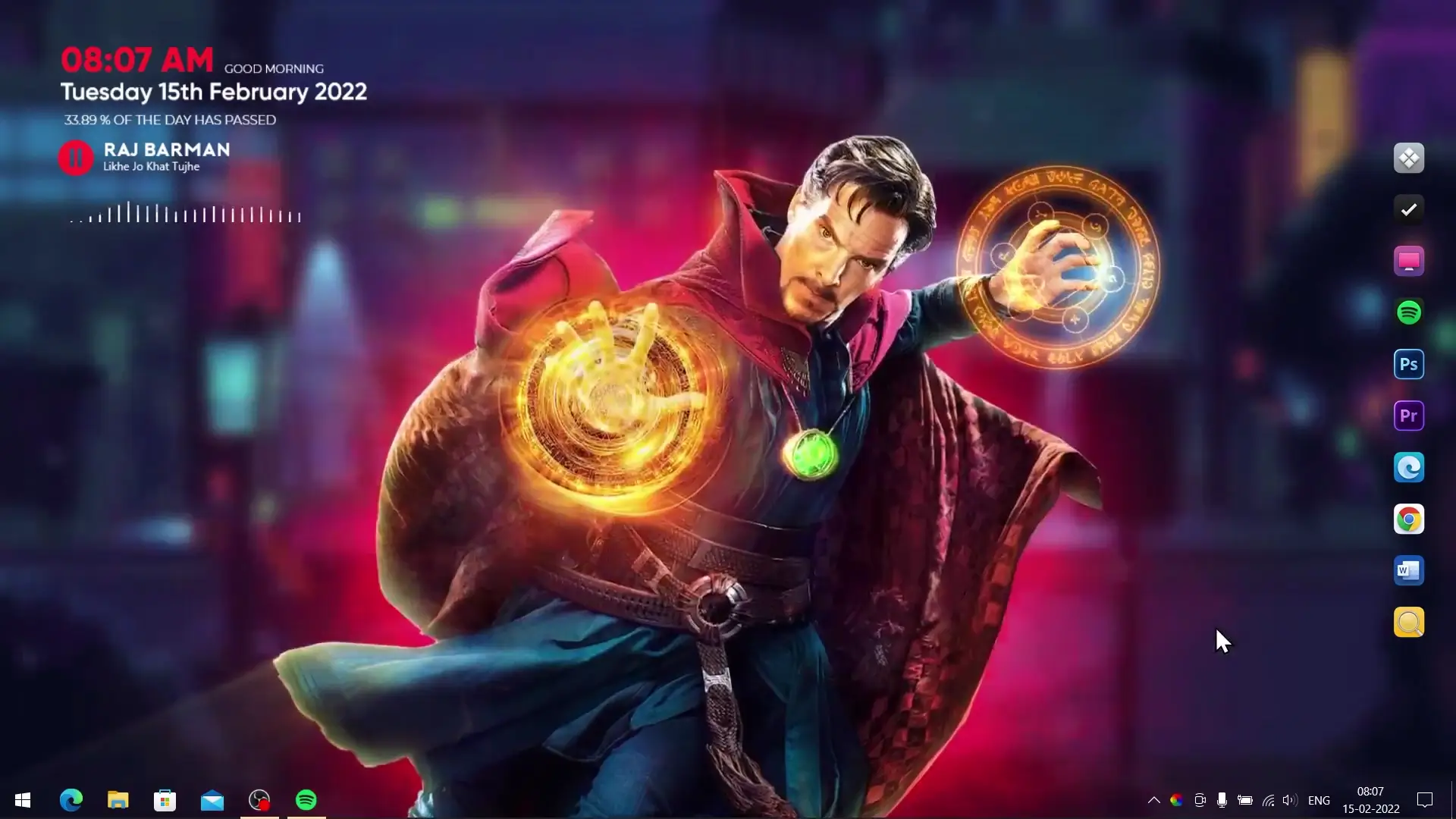
If you enjoy customizing your desktop and are a fan of Marvel’s mystical superhero, the Doctor Strange live wallpaper theme is a great way to give your Windows PC a stylish and animated look. This theme combines animated wallpaper, custom dock icons, and Rainmeter widgets to create a unique desktop setup that looks impressive but still runs smoothly on most systems.
The theme was created after many viewers requested a Doctor Strange animated desktop setup. It is designed to be lightweight so it does not use too much RAM or CPU. Even if your computer is not very powerful, you should still be able to run it comfortably.
In this guide, you will learn what this theme includes and how to install it step by step.
What Is Included in the Theme Package
The theme zip file contains several important components that work together to create the final desktop look. After downloading the theme, you will find the following items inside the zip file:
- Animated Doctor Strange live wallpaper
- Static wallpaper version (for users who prefer a normal background)
- Rainmeter widgets for desktop information and visual effects
- Winstep Nexus Dock configuration and icons
These tools help transform a regular Windows desktop into a visually appealing setup inspired by Doctor Strange.
Software Required for the Theme
Before installing the theme, you will need a few free programs. These applications allow the wallpaper animation, widgets, and dock icons to work properly.
The required tools include:
✅ DOWNLOAD ✅
All three programs are widely used for Windows desktop customization and are safe to install.
Step-by-Step Installation Guide
Follow these steps carefully to install the Doctor Strange live wallpaper theme on your computer.
1. Download and Extract the Theme
First, download the Theme Zip File that contains all the necessary resources. Once the file finishes downloading, extract it to a folder on your computer.
Inside the extracted folder you will find the wallpapers, Rainmeter widgets, and dock configuration files.
2. Apply the Wallpaper
You can choose between two wallpaper options.
If you prefer animation, install Lively Wallpaper from the Microsoft Store. After installing it, open Lively Wallpaper and load the Doctor Strange animated wallpaper from the theme folder.
If you prefer a simple background instead of animation, you can apply the included static wallpaper directly through Windows background settings.
3. Install Winstep Nexus Dock
Next, download and install Winstep Nexus Dock. This tool creates a stylish dock at the bottom of your screen.
After installing the dock:
- Copy the dock_icons folder from the theme files.
- Move it to the following location on your system:
C:\dock_icons
Then open Nexus Dock Settings, go to Advanced, and choose Restore. Select the file named wsbackup.wbk from the dock_icons folder. The dock icons will automatically update to match the theme.
4. Install Rainmeter Widgets
Finally, install Rainmeter on your PC.
Once installed, open Rainmeter and unload any default widgets if necessary. Then install the widgets included in the theme package, usually named Doctor Strange and Visualizer.
These widgets add extra visual elements to your desktop and help complete the overall look of the theme.
Final Result
After completing all the steps, your Windows desktop will display the Doctor Strange live wallpaper theme along with matching dock icons and widgets. The animated background and customization features create a clean and visually interesting desktop environment.
Since the theme is designed to be lightweight, it should run smoothly without putting too much load on your system.