If you enjoy customizing your desktop, a good theme can completely change the way your computer looks. A well-designed setup not only makes your screen attractive but also keeps useful information right on the desktop. The Windows Car Theme shown in this tutorial is built for users who want a clean and stylish desktop with a dynamic wallpaper and widgets.
This setup uses two well-known tools: Rainmeter and Lively Wallpaper. Together they allow you to add animated wallpapers and useful desktop widgets without complicated steps.
What Is the Windows Car Theme?
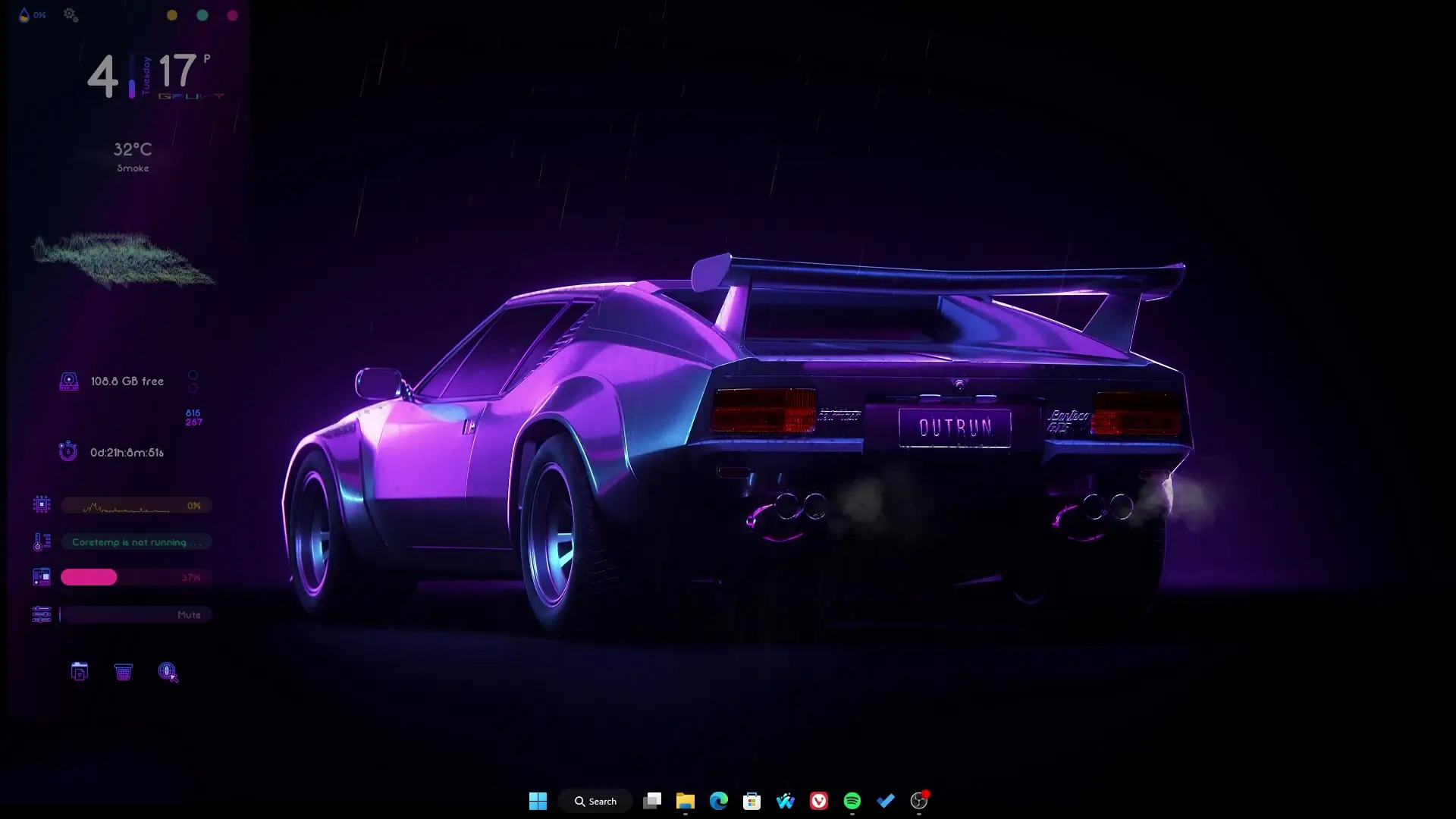
The Windows Car Theme is a desktop customization setup designed around a car-inspired wallpaper. The theme usually features a high-quality car background combined with minimal widgets such as a clock, system information, music controls, and shortcuts.
The goal is to create a desktop that feels modern and visually appealing without filling the screen with too many elements. The car wallpaper acts as the main focus, while Rainmeter widgets provide useful details like time, CPU usage, and quick links.
Because the theme is simple to install, it is suitable even for beginners who have never customized their desktop before.
Software Required for the Setup
To install this theme, you only need two programs. Both are widely used in the Windows customization community.
1. Rainmeter
Rainmeter is one of the most popular desktop customization tools for Windows. It allows users to add widgets called “skins” to their desktop.
With Rainmeter you can display:
- Clock and date widgets
- System performance information
- Music player controls
- Weather updates
- Custom shortcuts and launchers
Many desktop themes available online rely on Rainmeter to place widgets on the screen.
2. Lively Wallpaper
Lively Wallpaper is a free application that lets you use animated or interactive wallpapers on Windows.
Instead of a static background image, Lively Wallpaper can run video wallpapers, animated scenes, or motion backgrounds. In the car theme setup, it helps display the animated or dynamic car wallpaper that gives the desktop a premium look.
How to Install the Windows Car Theme
The installation process is straightforward and does not require complicated file editing. Follow these general steps:
Step 1: Install Rainmeter
Download and install Rainmeter on your computer. After installation, it will run in the background and allow widgets to appear on the desktop.
Step 2: Install Lively Wallpaper
Next, install Lively Wallpaper. Once installed, open the application and select the car wallpaper included in the theme files.
Step 3: Import the Theme Files
Download the theme setup files provided with the tutorial. These files normally include Rainmeter skins and the wallpaper needed for the theme.
Import the skins into Rainmeter and activate them from the Rainmeter manager.
Step 4: Arrange the Widgets
After enabling the widgets, place them on the desktop according to your preference. Most themes already have recommended positions so you can easily match the layout shown in the tutorial.
✅ DOWNLOAD ✅
API Key = 21d8a80b3d6b444998a80b3d6b1449d3Why Many Users Like This Setup
One reason this theme is popular is its simplicity. Many desktop themes require editing configuration files or adjusting settings manually. In this setup, most of the work is already done.
Another advantage is performance. Both Rainmeter and Lively Wallpaper are designed to run efficiently, so they usually do not slow down a modern computer when used with lightweight widgets.
The theme also works well for users who want a clean desktop with only essential information visible.
Final Thoughts
The Windows Car Theme is a great option if you want to give your desktop a fresh and stylish appearance. With just two applications—Rainmeter and Lively Wallpaper—you can turn a normal Windows desktop into something far more interesting.
The setup process is simple, the design looks modern, and the theme keeps the desktop organized while still highlighting the car-inspired wallpaper. Even if you are new to desktop customization, you should be able to install and enjoy this theme in just a few minutes.