Customizing your desktop is one of the easiest ways to make your computer feel more personal and visually appealing. Instead of using the same default background every day, many users now prefer themed desktop setups with widgets, live wallpapers, and stylish layouts. In this tutorial, the creator introduces a unique Spider-Man Mysterio Smoke Edition desktop setup that gives your screen a cool cinematic look.
Overview of the Spider-Man Mysterio Smoke Theme
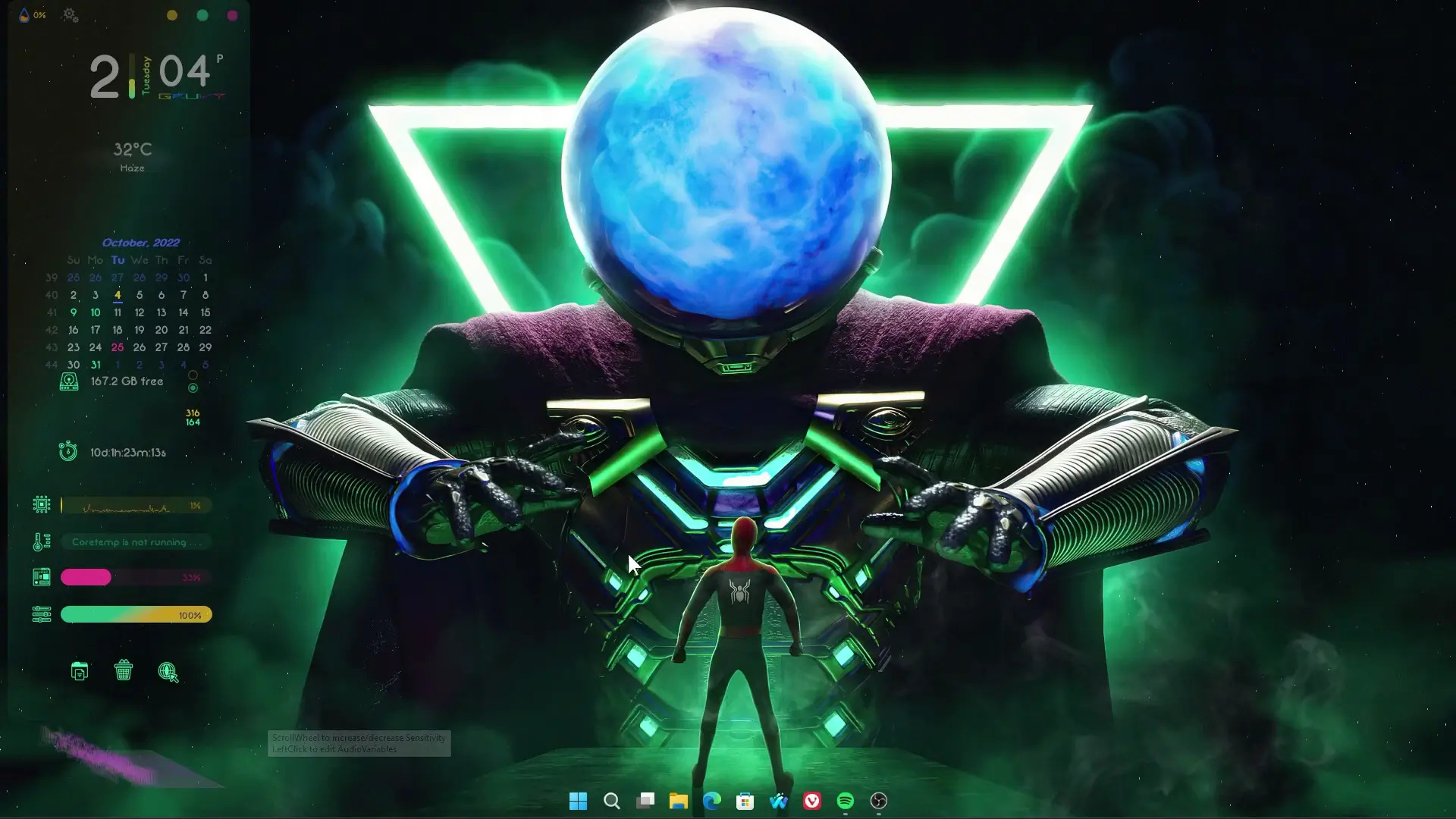
The Spider-Man Mysterio Smoke Edition theme is designed for users who enjoy superhero-inspired visuals combined with a clean desktop layout. The wallpaper features a dramatic smoke effect surrounding the Spider-Man and Mysterio theme elements, creating a mysterious and dynamic appearance on the screen.
One of the best parts of this setup is that it comes in two versions. Users can either use the live wallpaper version, which includes animated smoke effects, or the static wallpaper version, which shows the same design without animation. This makes the setup suitable for both high-performance computers and systems with limited resources.
The overall goal of this setup is to provide a stylish desktop look while keeping system usage low.
Rainmeter Widgets Used in the Setup
To build this desktop layout, the tutorial uses Rainmeter, a popular desktop customization tool for Windows. Rainmeter allows users to add widgets such as clocks, system monitors, visualizers, and shortcuts directly on the desktop.
In this setup, Rainmeter is used to place minimal widgets that match the dark superhero theme. These widgets blend with the wallpaper and create a balanced layout instead of cluttering the screen.
Some advantages of using Rainmeter include:
- Lightweight performance compared to many customization tools
- Fully customizable widgets and skins
- Ability to create modern and minimal desktop designs
- Large community with many free skins available
Because Rainmeter is essential for this theme, installing it is the first step before applying the setup files.
Optimized for Better Performance
A common concern with animated wallpapers and widgets is system performance. Many live wallpapers can consume extra RAM or CPU resources, which may slow down older computers.
The creator mentions that the theme files were adjusted to make them lighter so they do not use too much system power. This means users can enjoy the animated smoke effect while still maintaining smooth performance.
For users who prefer the simplest setup, the static wallpaper option is also included. This version removes animation entirely while keeping the same visual style.
What You Need to Apply the Setup
To recreate this desktop setup, you only need a few basic things:
- Rainmeter installed on your system
- The theme setup files provided by the creator
- The Spider-Man Mysterio wallpaper (live or static version)
✅ DOWNLOAD ✅
API KEY: 21d8a80b3d6b444998a80b3d6b1449d3After downloading the files, simply follow the tutorial steps shown in the video. The process usually involves importing the Rainmeter skins and setting the wallpaper.
Once completed, your desktop will look similar to the theme shown in the video.
Final Thoughts
If you enjoy superhero-style desktop designs, the Spider-Man Mysterio Smoke Edition desktop setup is definitely worth trying. The combination of dark visuals, smoke effects, and minimal widgets gives your computer a modern and cinematic appearance.
Another good aspect of this setup is its flexibility. You can choose between a live animated wallpaper or a simple static version depending on your system performance and personal preference.
By following the tutorial and installing Rainmeter with the provided setup files, you can quickly transform a normal Windows desktop into a stylish Spider-Man themed workspace.