
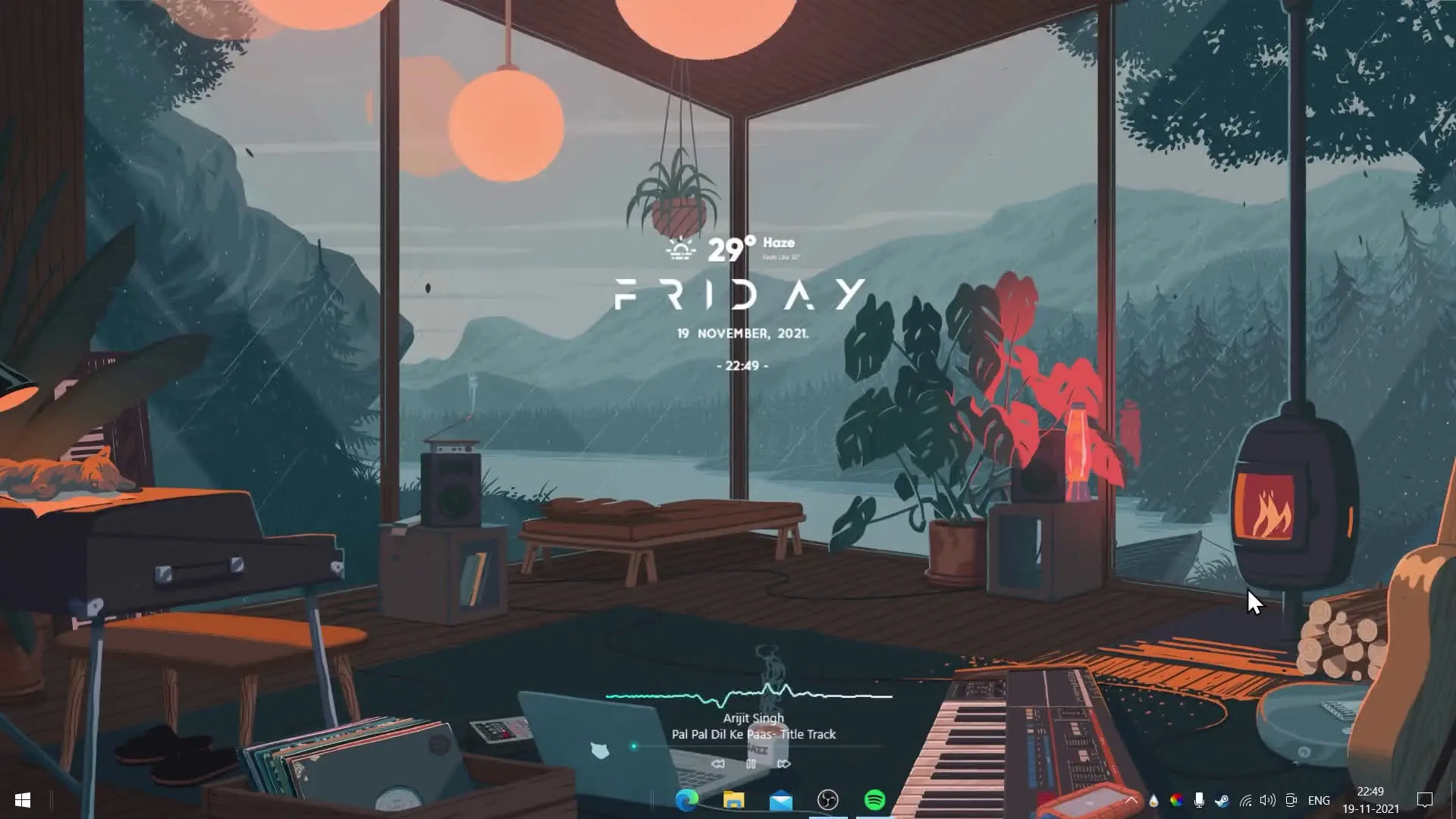
Personalizing your desktop can make your computer feel fresh and enjoyable to use. Many people like to customize their Windows desktop with widgets, wallpapers, and clean layouts that improve both appearance and usability. In this guide, we will look at a simple and lightweight desktop setup that helps your system look modern without using too much RAM. This setup is designed to run smoothly even on mid-range or older computers.
Overview of the Desktop Theme Setup
This desktop theme is part of a series focused on improving the overall appearance of a computer desktop. The fourth part of the series focuses on creating a minimal and lightweight design. Unlike heavy customization packs that slow down the system, this theme keeps things simple while still giving a stylish and organized look.
The design focuses on three main goals:
- Keeping RAM usage low
- Creating a clean and modern interface
- Adding useful widgets such as time, weather, and system information
Because the setup uses lightweight tools, it works well for users who want customization without affecting system performance.
Tools Required for the Setup
To recreate this desktop look, a few tools and components are required. Each tool plays a different role in building the final appearance of the desktop.
✅ DOWNLOAD ✅
Lively Wallpaper
Lively Wallpaper is used to add animated wallpapers to the desktop. Instead of static backgrounds, it allows videos or dynamic visuals to run as the wallpaper. One advantage of Lively Wallpaper is that it is optimized to reduce system usage, so it pauses animations when you run full-screen apps or games.
This helps maintain performance while still allowing a visually appealing background.
Rainmeter
Rainmeter is one of the most popular desktop customization tools for Windows. It allows users to add widgets directly to the desktop such as:
- Clock widgets
- Weather information
- System performance monitors
- Music player controls
Rainmeter skins can be easily installed and arranged to match the style you want. It is lightweight and highly customizable.
Mond by ApexXx-SenSei
Mond is a clean and minimal Rainmeter skin that displays important information such as:
- Time and date
- System usage
- Basic shortcuts
It is designed to blend nicely with modern desktop layouts. The circular and minimal design helps keep the desktop uncluttered while still being useful.
RetrOcOlOr Icons
Icons also play an important role in the overall desktop appearance. RetrOcOlOr icon packs are used to give applications a consistent and stylish look. Instead of the default Windows icons, these icons provide a more colorful and modern style.
Using a matching icon pack helps create a uniform desktop design.
Small Clean Weather Widget
Weather widgets are helpful for checking current conditions quickly without opening a browser. The Small Clean Weather widget is a simple Rainmeter skin that displays weather information in a minimal layout.
Because it is lightweight, it does not use much memory and fits well with a clean desktop design.
Installation Files Included in the Theme Pack
All required files are usually included inside a single ZIP package. This makes the setup process easier because users do not need to search for each file individually.
The ZIP file generally contains:
- Font files used for the widgets
- Lively Wallpaper configuration
- Rainmeter skins
- Required theme elements
After extracting the ZIP file, you can install the fonts and import the Rainmeter skins to start applying the theme.
Benefits of Using a Lightweight Desktop Theme
Many desktop customization setups look attractive but can slow down the computer. This theme focuses on maintaining good performance while still improving the desktop appearance.
Some key benefits include:
- Lower RAM consumption
- Faster system performance
- A clean and modern desktop layout
- Easy installation and setup
This makes the theme suitable for everyday users as well as people who enjoy customizing their workspace.
Final Thoughts
Customizing your desktop does not have to be complicated or resource-heavy. With tools like Lively Wallpaper and Rainmeter, it is possible to create a stylish desktop that remains smooth and responsive.
This lightweight theme setup offers a balanced combination of aesthetics and performance. If you enjoy organizing your desktop and giving your computer a fresh look, trying a setup like this can be a great option.








good!!