Many people like to personalize their desktop so it feels more modern and visually appealing. A clean theme with animations, music visualizers, and widgets can completely change how a computer looks. In a recent video tutorial, a creator shows how to transform a normal desktop into an impressive animated setup using Lively Wallpaper and a few additional tools. This guide explains the theme, the tools used, and how you can set up a similar desktop style.
What This Desktop Theme Is About
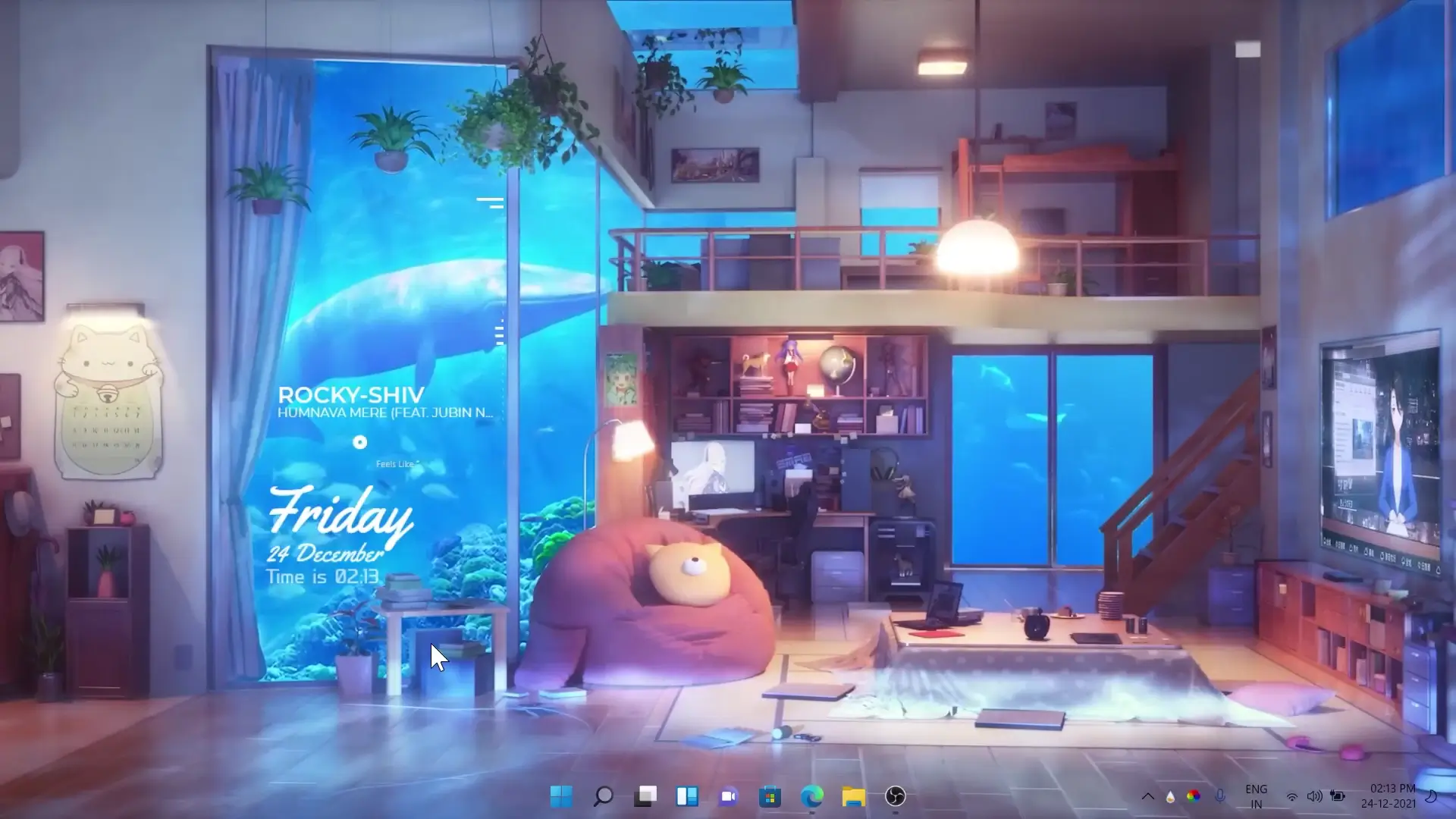
The theme demonstrated in the video focuses on creating a stylish desktop with animated wallpapers and a music visualizer. The design is inspired by a theme originally available on Steam Workshop created by MoriyaShrineKanako. However, many users do not have access to Wallpaper Engine on Steam. To solve this problem, the creator adapted the theme so it can work with Lively Wallpaper, which is a free alternative.
This makes the setup more accessible because anyone can install Lively Wallpaper without purchasing Wallpaper Engine. The result is a desktop that looks dynamic and modern, featuring animated backgrounds and real-time music visualization.
Tools Used in the Setup
To make the desktop look the way it does in the video, several tools are required. Each one plays an important role in creating the final appearance.
✅ DOWNLOAD ✅
1. Lively Wallpaper
Lively Wallpaper is the main software used for animated backgrounds. It allows users to set videos, web pages, or custom animations as their desktop wallpaper. Unlike static wallpapers, lively backgrounds can react to music or display moving visuals.
2. Rainmeter
Rainmeter is a popular desktop customization tool. It allows users to add widgets such as clocks, system monitors, weather displays, and music controls. In this setup, Rainmeter is used to place the music visualizer and other desktop elements.
3. Monstercat Visualizer
The Monstercat Visualizer is a well-known Rainmeter skin used for audio visualization. When music plays on your computer, the visualizer shows animated bars that react to the sound. This creates an engaging visual effect on the desktop.
4. WebNowPlaying
WebNowPlaying is a plugin that connects Rainmeter with music players and streaming platforms. It allows the Monstercat Visualizer to detect the music that is currently playing in your browser or media player.
5. WebNowPlaying Companion
The companion extension works together with WebNowPlaying to ensure compatibility with browsers such as Chrome or Edge. Without this extension, the visualizer may not detect music from streaming services.
How the Theme Works
Once all tools are installed, the theme files provided in the download package are applied. The animated wallpaper runs through Lively Wallpaper while Rainmeter loads the visualizer skin. When music plays on your system or through a supported streaming service, the Monstercat Visualizer responds instantly, producing moving bars that match the rhythm of the audio.
The combination of animation, widgets, and audio effects creates a desktop that feels more interactive than a normal setup.
Why Many Users Prefer This Setup
One of the biggest advantages of this theme is that it does not require paid software. Wallpaper Engine themes are often limited to Steam users, but Lively Wallpaper offers similar functionality for free. Because of this, more users can enjoy animated desktops without spending money.
Another benefit is customization. Rainmeter skins can be modified to change colors, positions, and styles. Users can adjust the layout to match their personal taste or monitor resolution.
Final Thoughts
Custom desktop themes can make everyday computer use more enjoyable. The setup shown in the video demonstrates how a combination of Lively Wallpaper, Rainmeter, and the Monstercat Visualizer can create an impressive animated desktop environment. Since all the required tools are free and easy to install, anyone can try this theme and give their computer a fresh new look.
If you enjoy customizing your desktop, this theme is a simple way to start experimenting with animated wallpapers and music visualizers.