Many people spend several hours every day in front of their computers. A cluttered or dull desktop can feel tiring and uninspiring. One simple way to improve your workspace is by creating a nature-friendly desktop environment. A desktop that shows natural elements such as greenery, rain, or calm landscapes can make your screen feel more relaxing and visually appealing.
In this guide, you will learn how to transform your desktop into a nature-inspired workspace using a few free tools and customization options. The process is simple and does not require advanced technical knowledge. By following these steps, you can create a clean and natural desktop layout that feels refreshing every time you turn on your computer.
Why Create a Nature-Friendly Desktop
A nature-inspired desktop theme helps create a calm and pleasant environment while working or browsing. Natural wallpapers, soft colors, and minimal widgets reduce visual clutter and make the screen look organized.
Many users prefer this style because it gives a peaceful feeling similar to being surrounded by nature. Whether you are studying, working, or simply using your computer for entertainment, a natural desktop setup can make the experience more enjoyable.
Tools You Need for the Setup
- Rainmeter
- Mond by ApexXx-SenSai
- Small Clean Weather
- Anurati Font (Free Version)
- Winstep Nexus Dock
- Winstep Natural Look Settings
- StartIsBack
- Lively Wallpaper
- Wallpaper
To create this nature-friendly desktop look, several customization tools are used. Each tool plays a specific role in shaping the final appearance of your desktop.
Rainmeter
Rainmeter is one of the most popular desktop customization tools for Windows. It allows users to add widgets such as clocks, weather information, system statistics, and other useful elements directly on the desktop.
With Rainmeter, you can create a clean and minimal interface that blends perfectly with your wallpaper.
Mond Skin by ApexXx-SenSai
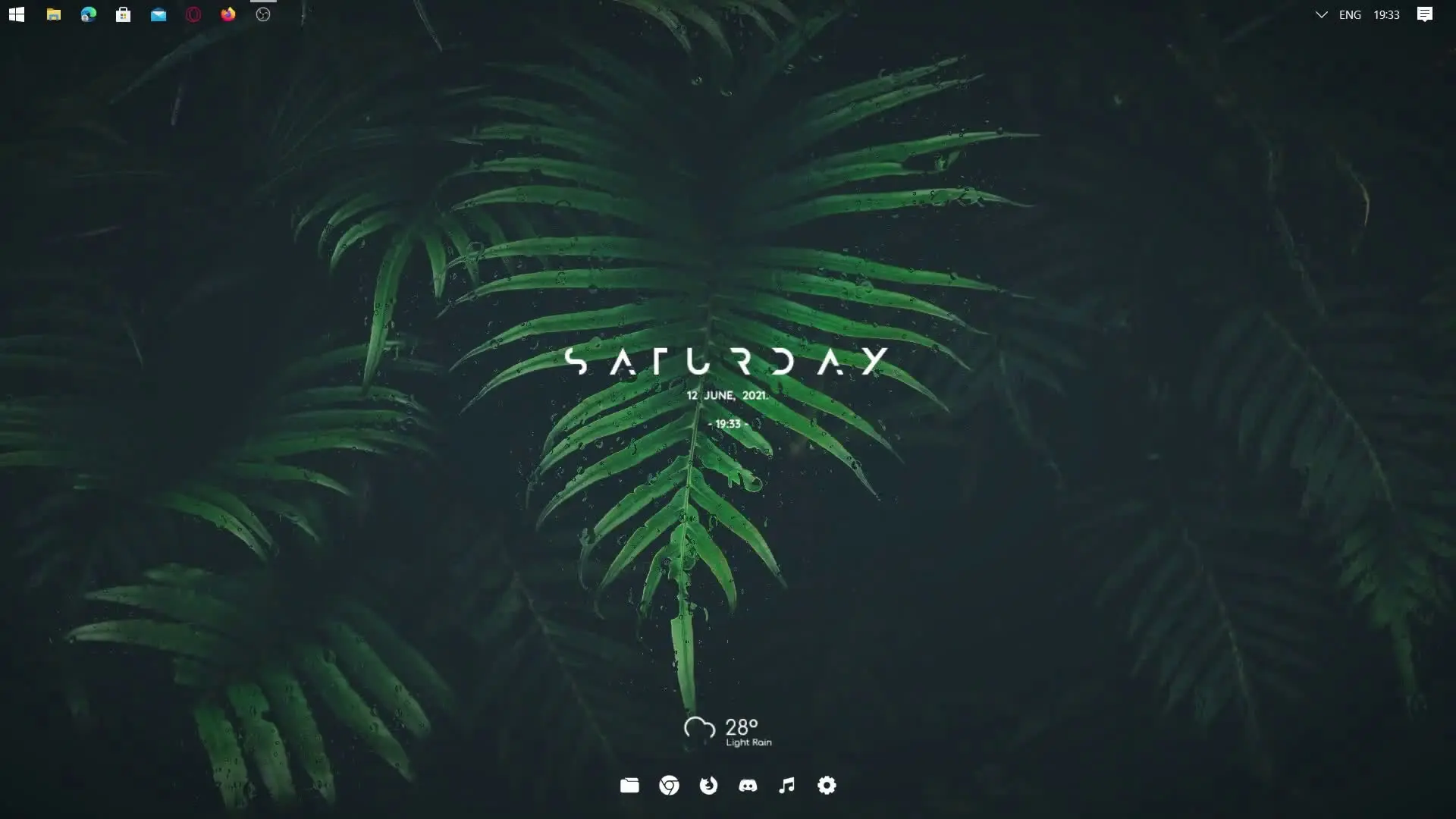
Mond is a Rainmeter skin that provides a modern and minimal layout. It includes widgets such as time, date, system usage, and shortcuts. The design fits well with nature wallpapers because it keeps the interface simple and elegant.
Small Clean Weather Widget
This widget displays weather information in a small and minimal format. It adds useful information to your desktop without making the screen look crowded.
Fonts Used in the Setup
Typography plays an important role in the overall look of your desktop. In this setup, the Anurati Font (Free Version) is used. This font has a futuristic and clean design that works well with modern desktop layouts.
Using a unique font helps give your desktop a distinctive appearance while keeping the text easy to read.
Creating a Dock for Quick Access
To make the desktop look more organized, a dock is added using Winstep Nexus Dock. This tool creates a smooth dock similar to the one seen in macOS.
With this dock, you can place your most frequently used applications in one location. It not only improves accessibility but also adds a stylish element to your desktop.
Using the Winstep Natural Look Settings, the dock can be customized to blend naturally with the wallpaper and overall theme.
Enhancing the Start Menu Experience
Another tool used in this setup is StartIsBack. This software improves the appearance and functionality of the Windows Start menu.
It allows users to customize the Start menu style so it matches the overall desktop design. This helps maintain a consistent visual theme across the entire system.
Adding Live Nature Wallpapers
A static wallpaper looks good, but a live wallpaper can make the desktop feel more alive. Lively Wallpaper is used to add animated backgrounds.
With Lively Wallpaper, you can set beautiful moving scenes such as rain, forests, waterfalls, or relaxing landscapes. These dynamic visuals make the desktop feel more immersive and closer to nature.
Choosing the right wallpaper is important because it acts as the foundation for the entire design.
Final Result
Once all these elements are set up together, the result is a clean, minimal, and nature-inspired desktop. The combination of Rainmeter widgets, a smooth dock, custom fonts, and animated wallpapers creates a relaxing workspace.
The best part is that this setup is flexible. You can modify widgets, wallpapers, and colors according to your personal preference.
With just a few tools and a little customization, anyone can turn their ordinary desktop into a calm and nature-friendly digital environment.