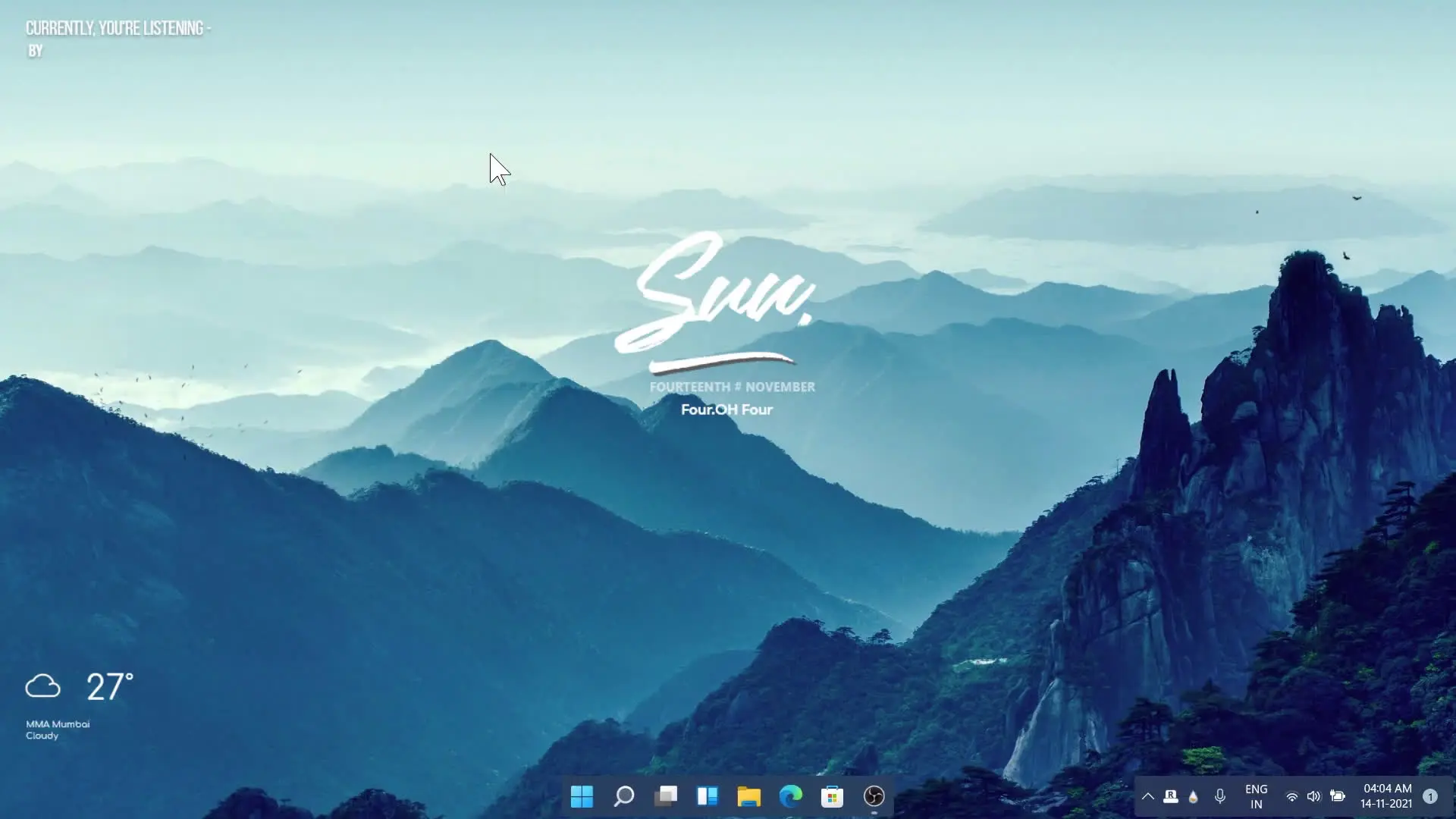
A clean and aesthetic desktop can completely change the way your computer feels to use. Instead of a cluttered screen full of random icons, an organized and visually pleasing desktop can make your workspace calm, focused, and enjoyable. In this guide, you will learn how to create a beautiful desktop setup using a scenic wallpaper, simple widget tools, and a few easy customization tricks.
Choosing the Right Wallpaper
The first and most important step in creating an aesthetic desktop is selecting the right wallpaper. A good wallpaper sets the mood of your entire screen.
In this setup, a blue icy mountain wallpaper is used. Mountain landscapes are popular for aesthetic desktops because they create a peaceful and natural look. The cool blue tones give the screen a calm and minimal vibe that is easy on the eyes.
Another interesting detail in the wallpaper is the two groups of birds flying near the mountains. Small elements like this add life to the background and make the scene feel more natural rather than plain or static.
When choosing your wallpaper, try to pick images that:
- Use soft or cool color tones
- Have open space so icons don’t look crowded
- Match the overall theme you want for your desktop
Nature wallpapers such as mountains, lakes, forests, or snowy landscapes usually work very well.
Adding Widgets for a Clean Look
Widgets are one of the best ways to make a desktop look modern and aesthetic. They add useful information while also improving the visual design of the screen.
In this setup, widgets are used to make the desktop look more natural and organized. Instead of placing many icons everywhere, widgets allow you to display important information in a clean layout.
Common widgets used in aesthetic desktops include:
- Clock widgets
- Weather widgets
- System information widgets (CPU, RAM, battery)
- Calendar widgets
Placing widgets on the side of the screen helps keep the center area clean so the wallpaper remains visible.
Organizing Desktop Icons
One mistake many people make is filling their desktop with too many icons. This makes the screen look messy and ruins the aesthetic appearance.
To keep your desktop clean:
- Group similar apps into folders
- Keep only the most used shortcuts on the desktop
- Align icons neatly on one side of the screen
Some people even remove all icons completely and only use the taskbar or start menu. This gives the desktop a very minimal and modern style.
Matching Colors and Theme
Aesthetic desktops usually follow a single color theme. In this case, the blue icy mountain wallpaper sets the main color palette.
To match the theme, you can:
- Use blue or transparent widgets
- Change the system accent color to blue
- Use simple icon packs that match the wallpaper style
Keeping the same color theme across widgets, icons, and wallpaper makes the desktop look professional and balanced.
Once the wallpaper, widgets, and icon layout are set properly, the desktop looks clean, modern, and relaxing. The mountain wallpaper with flying birds gives a peaceful outdoor feeling, while the widgets add both style and functionality.
With just a few simple changes, anyone can transform a basic desktop into a beautiful aesthetic workspace that feels pleasant to use every day.
If you want to recreate this look, follow the steps shown in the video and customize your desktop according to your own style. A well-designed desktop not only looks great but can also improve productivity and make your computer experience more enjoyable.
✅ DOWNLOAD ✅