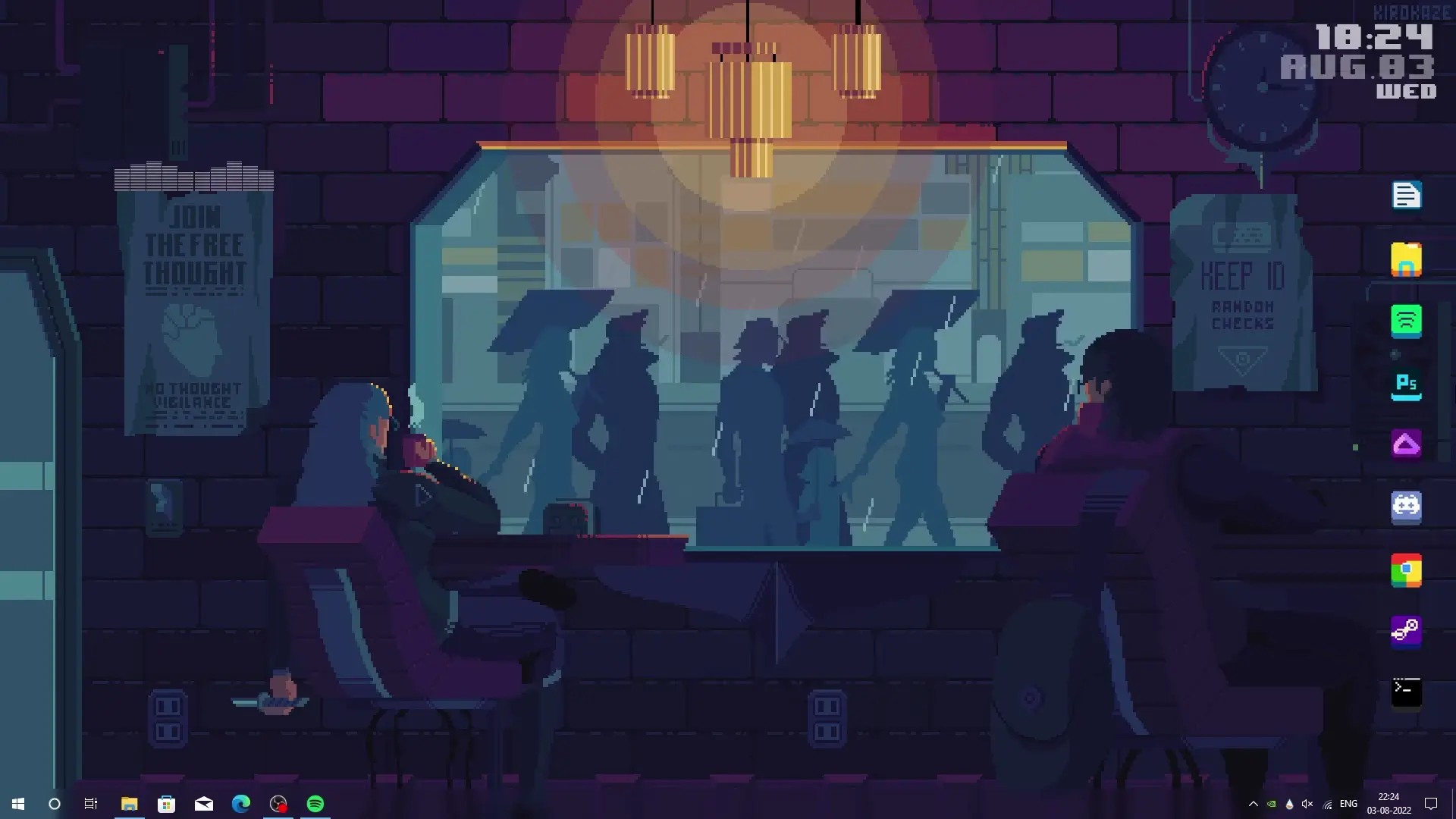
If you enjoy retro gaming aesthetics, an 8 Bit desktop theme is a fun way to give your Windows PC a nostalgic look. After sharing the Mario 8 Bit theme earlier, many viewers requested another similar customization tutorial. This new setup focuses on simplicity, performance, and a classic pixel-style design.
The best part about this theme is that it does not consume much CPU or RAM. Unlike heavy desktop skins or complex visual packs, this setup is designed to stay lightweight while still making your desktop look unique. In this article, we will explain what this theme includes and how you can set it up easily on your computer.
What Makes the 8 Bit Desktop Theme Special
The 8 Bit desktop theme is inspired by the visual style of classic retro games. Pixel art, minimal colors, and simple icons create a nostalgic atmosphere that many users love.
This setup is designed to be lightweight, which means it works smoothly even on systems with limited hardware resources. If you prefer a clean desktop without heavy animations or complicated widgets, this theme can be a great option.
Another advantage is that the customization process is simple. You do not need advanced technical knowledge to install it. With a few tools and the provided theme files, your desktop can be transformed in just a few minutes.
Tools Required for the Setup
To apply this desktop theme, you will need a few commonly used customization tools. These tools are widely used by Windows customization enthusiasts and help create a personalized desktop layout.
✅ DOWNLOAD ✅
1. Rainmeter
Rainmeter is one of the most popular desktop customization tools for Windows. It allows you to add widgets such as clocks, system monitors, and visual elements directly on your desktop.
For this theme, Rainmeter is used to display pixel-style widgets that match the 8 Bit aesthetic. The widgets are designed to be simple and efficient, so they do not use too many system resources.
2. Nexus Dock
Nexus Dock is another useful tool that replaces the traditional Windows taskbar with a stylish dock. It allows quick access to your most frequently used applications while keeping your desktop organized.
In this theme setup, Nexus Dock helps create a cleaner layout and improves navigation across different apps.
3. Theme Setup Files
The theme setup files contain the visual elements needed for the customization. These files may include wallpapers, Rainmeter skins, icons, and configuration settings required for the theme to work properly.
Once downloaded, these files can be applied through Rainmeter and other tools to complete the setup.
How to Install the 8 Bit Desktop Theme
Installing this theme is a straightforward process. Follow these general steps to get started.
- Download and install Rainmeter on your computer.
- Install Nexus Dock if you want the dock interface shown in the tutorial.
- Download the theme setup files provided with the tutorial.
- Import the Rainmeter skins included in the theme package.
- Arrange the widgets and dock layout according to the design shown in the video.
After completing these steps, your desktop should display the full 8 Bit theme style.
Performance and System Usage
One of the main goals of this setup is to keep resource usage low. Many desktop customization themes look impressive but can slow down the system.
This particular setup focuses on minimal widgets and simple design elements. Because of this, the CPU and RAM usage remain low, making it suitable even for older computers or laptops.
If you want a desktop theme that looks stylish without affecting performance, this setup is a good choice.
Final Thoughts
The 8 Bit desktop theme is a great option for anyone who enjoys retro gaming visuals and clean desktop layouts. With tools like Rainmeter and Nexus Dock, you can quickly transform your Windows desktop into a lightweight and visually appealing workspace.
If you liked the previous Mario-style customization, this theme offers a similar nostalgic feel while keeping the design simple and efficient.
Download the required files, follow the setup instructions, and enjoy your newly customized 8 Bit desktop experience.