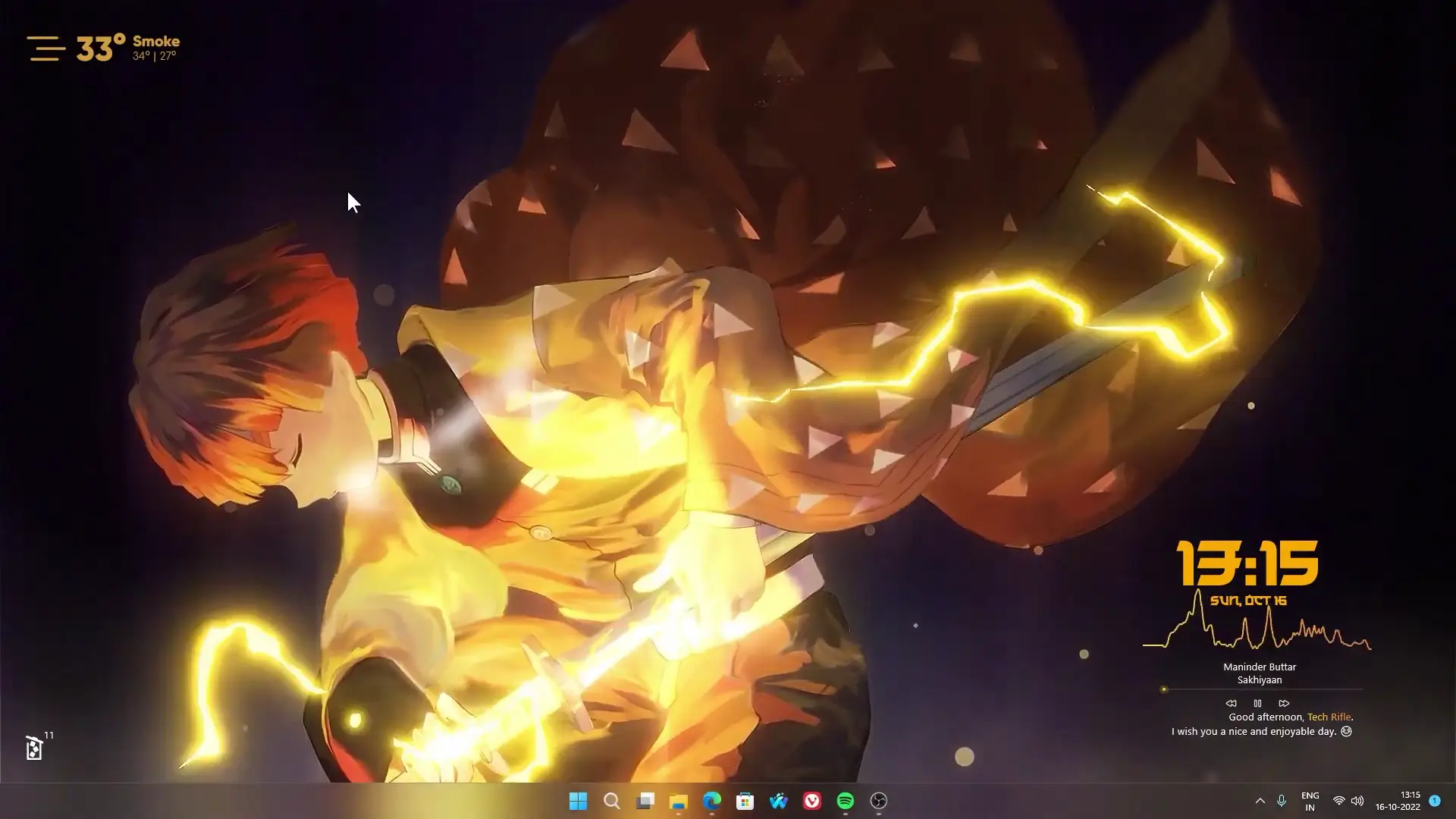
Anime themed desktop setups are very popular among fans who want their computer screen to look unique and personal. One of the most requested themes is based on Zenitsu Agatsuma from Demon Slayer. In this tutorial style setup, the desktop is customized with a Zenitsu live wallpaper along with several Rainmeter widgets to give the screen a clean anime look.
This setup was requested by many viewers who enjoyed earlier customization videos and wanted a Demon Slayer themed desktop. The wallpaper used in this setup was originally created by the artist 大污师! and is available on Steam through Wallpaper Engine. For users who do not own Wallpaper Engine, the setup also shows how to use Lively Wallpaper, which is a free alternative that allows animated wallpapers on Windows.
The final result is a stylish desktop layout that combines animated wallpaper, system widgets, and a clean theme suitable for everyday use.
Demon Slayer Desktop Theme Overview
This desktop theme focuses on keeping the layout minimal while highlighting the animated Zenitsu wallpaper. Instead of filling the screen with too many widgets, the setup uses only a few elements that improve the look without making the desktop messy.
The wallpaper features Zenitsu Agatsuma with his lightning effects, which fits perfectly with a dark themed desktop environment. When paired with transparent widgets and a clean system layout, the desktop looks both modern and visually appealing.
The theme is especially suitable for anime fans who want their PC to reflect their interests while still keeping everything functional.
Tools Required for the Setup
To recreate this Demon Slayer desktop theme, a few customization tools are used. All of them are easy to install and widely used in the Windows customization community.
1. Rainmeter
Rainmeter is the main tool used for adding widgets to the desktop. It allows users to display useful information such as system stats, weather updates, clocks, and music players.
In this setup, Rainmeter is used to add clean and minimal widgets that match the overall anime theme without distracting from the wallpaper.
2. RetrOcOlOr Skin
RetrOcOlOr is a stylish Rainmeter skin that displays system information such as CPU usage, RAM usage, storage, and other performance data. Its clean design makes it a good choice for modern desktop setups.
3. Small Clean Weather
This widget displays current weather information on the desktop. The design is simple and transparent, which blends nicely with the Zenitsu wallpaper.
4. Lively Wallpaper (Free Option)
Lively Wallpaper allows users to apply animated wallpapers to their desktop for free. This is a great option for people who do not want to purchase Wallpaper Engine.
5. Wallpaper Engine (Optional)
If you already have Wallpaper Engine installed through Steam, you can skip the Lively Wallpaper installation steps. The Zenitsu live wallpaper is available directly on the Steam Workshop, making it easy to install and apply.
✅ DOWNLOAD ✅
If you have legit wallpaper engine install from steam and dont want to install lively wallpaper then here is the like for steam version -> Zenitsu Agatsuma Live Wallpaper
API Key = 21d8a80b3d6b444998a80b3d6b1449d3Zenitsu Agatsuma Live Wallpaper
The highlight of this setup is the Zenitsu Agatsuma live wallpaper inspired by the Demon Slayer anime. The wallpaper features Zenitsu surrounded by lightning effects, creating a dramatic and energetic look on the desktop.
Because it is an animated wallpaper, the background feels more dynamic compared to static images. The movement of lightning effects adds life to the desktop while still maintaining a smooth and clean visual style.
For anime fans, this wallpaper works perfectly as the centerpiece of the entire theme.
Why This Setup Works Well
One reason this theme looks great is the balance between visual design and usability. The wallpaper takes center stage while the widgets remain minimal and useful.
The combination of dark tones, lightning effects, and transparent widgets gives the desktop a modern anime aesthetic. At the same time, the layout keeps important information like system stats and weather easily accessible.
Another advantage is flexibility. Users can choose between Wallpaper Engine or Lively Wallpaper, depending on whether they prefer a free option or a Steam-based solution.
Final Thoughts
This Demon Slayer desktop theme is a great choice for anyone who enjoys anime and wants a customized Windows setup. With the Zenitsu live wallpaper, Rainmeter widgets, and a clean layout, the desktop becomes both functional and visually impressive.
The setup is simple enough for beginners while still offering enough customization to make the desktop feel unique. Whether you use Wallpaper Engine or the free Lively Wallpaper option, the result is a stylish anime themed workspace that stands out from the default Windows look.
If you are a fan of Demon Slayer or anime in general, this setup is definitely worth trying on your desktop.