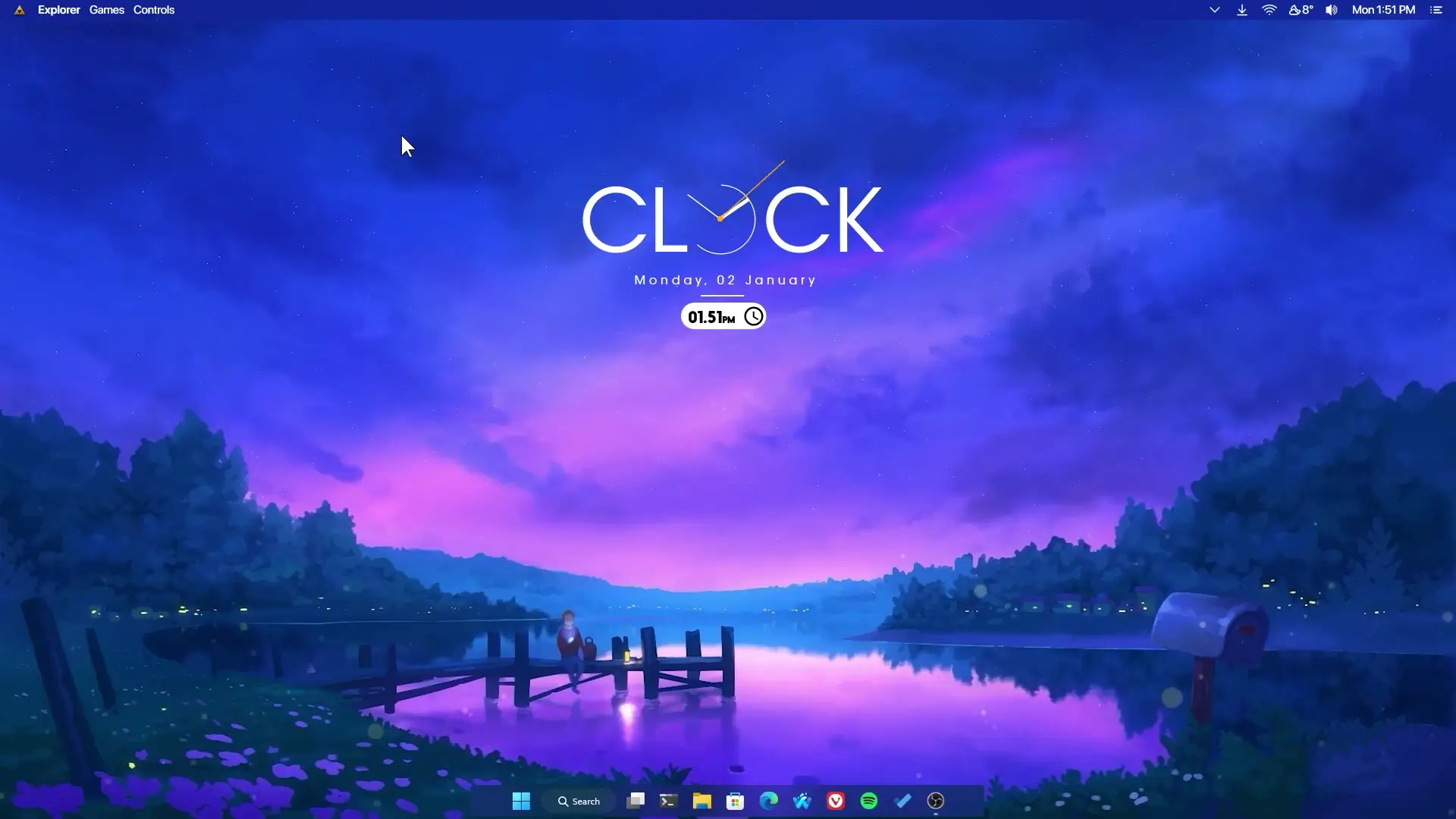
If you enjoy making your Windows desktop look clean and unique, this purple lake theme setup is a great option. The design focuses on a calm purple environment with a beautiful lake wallpaper that creates a relaxing vibe on your screen. The customization is simple and does not require coding or advanced technical steps. Everything can be installed with a few tools and basic settings.
This setup became popular after a previous purple fishing theme customization video. Because many people liked that design, this version continues the same purple style but with a different wallpaper and layout. The goal is to create a stylish desktop that looks modern while still being easy to set up for beginners.
Desktop Theme Overview
The main highlight of this customization is the purple evening sky wallpaper with a lake scene. It gives the desktop a calm and aesthetic look. When combined with widgets and a clean taskbar style, the overall setup feels organized and visually pleasing.
The theme includes a centered clock widget, a live wallpaper background, and a rounded taskbar layout. These elements work together to give the desktop a minimal but attractive appearance.
Another good thing about this setup is that it does not require editing scripts or configuration files. Everything works by installing the required tools and loading the provided theme files.
Tools Required for This Setup
To apply this customization, you only need a few free tools. These applications help control wallpapers, widgets, and taskbar styling.
✅ REQUIREMENTS ✅
1. Lively Wallpaper
Lively Wallpaper is used to apply the animated or live background. It allows you to run video or animated wallpapers smoothly on Windows. The purple evening sky wallpaper used in this setup is applied through Lively Wallpaper.
2. Rainmeter
Rainmeter is one of the most popular desktop customization tools for Windows. It allows you to add widgets like clocks, system information panels, and other visual elements. In this setup, Rainmeter is used to display the clock and date widget.
3. Theme Setup ZIP File
The theme setup file contains the wallpaper and the Rainmeter widget folder called Clocki. This folder includes the clock and date widgets used in the tutorial.
4. Droptop
Droptop helps create a clean desktop experience by organizing shortcuts and improving the overall layout.
5. RoundedTB
RoundedTB modifies the Windows taskbar and gives it a modern rounded style. It helps make the taskbar look cleaner and more minimal.
Installing the Theme
First, download and install Lively Wallpaper from the Microsoft Store. After installing it, download Rainmeter and the Theme Setup ZIP file provided in the tutorial.
Once Rainmeter is installed, open it and unload the default widgets that appear on the desktop. This will give you a clean workspace to apply the new theme.
Next, extract the theme setup ZIP file. Inside the folder you will find the Clocki widget. Move this folder to:
Documents → Rainmeter → Skins
After placing the folder there, open Rainmeter from the system tray and press the Refresh button. A new folder called Clocki will appear in the Rainmeter skins list.
Open the Clocki folder and load the Date and Time widget. You can drag and place it in the center of your desktop to match the layout shown in the tutorial.
Setting the Live Wallpaper
Now open Lively Wallpaper and select the option to add a new wallpaper. Navigate to the theme setup folder and choose the file named Anime Purple Evening Sky 4K.
Once applied, the animated wallpaper will appear on your desktop. If you are using a laptop, you can also adjust the Lively Wallpaper settings to reduce resource usage when running on battery.
Customizing the Taskbar
The final step is to install RoundedTB from the Microsoft Store. After installing it, adjust the settings to create a rounded taskbar style.
RoundedTB helps make the taskbar look more modern and minimal, which matches the purple desktop theme perfectly.
Final Result
After completing all the steps, your Windows desktop will have a stylish purple lake theme with a live wallpaper background, centered clock widget, and clean taskbar design. The entire setup is simple to apply and works well even if you are new to desktop customization.
This theme is a great choice for anyone who likes aesthetic desktop setups without complicated configuration steps.